
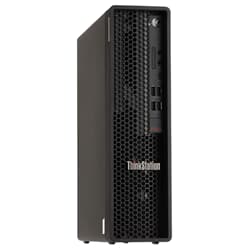
Lenovo ThinkStation P340 – Compact professional workstation for CAD, development & content creation
The Lenovo ThinkStation P340 is a powerful workstation platform built for professional workloads where stability, expandability and reliable day-to-day performance matter. As a refurbished and tested workstation, the P340 is a strong choice for CAD workflows, engineering applications, software development and productive office environments that require more performance than a standard desktop PC – while still offering an excellent price-to-performance ratio.
Lenovo ThinkStation P340 systems are ideal if you are looking for a professional tower workstation that can be configured to match your workload and remains stable even under sustained load.
Who is the Lenovo ThinkStation P340 best suited for?
The ThinkStation P340 is designed for users who need more than a typical desktop PC: reliable compute power for demanding tasks, more headroom for memory and storage, and the option to run a suitable GPU for professional workflows. Common use cases include:
- CAD and engineering design (2D/3D, technical drawings, small to mid-size assemblies)
- Architecture and planning software
- 3D applications with moderate scenes (modeling, viewport work)
- Content creation (photo work, light to mid-range video projects)
- Software development, local builds and test environments
- Office + multitasking with a focus on stability and longevity
Workstation vs regular PC: the technical advantages
Compared to many standard desktop PCs, a workstation like the ThinkStation P340 is designed for professional requirements. This includes a robust platform, reliable components and better suitability for sustained workloads. Depending on configuration, typical advantages include:
- Workstation-grade CPU platform for stable performance under load
- Good expandability for RAM and storage
- Support for professional graphics cards (depending on model/availability)
- Solid chassis and cooling design for consistent performance
- Well suited for productive work with professional software
CPU, RAM and SSD: what matters most in configuration
To make the ThinkStation P340 feel truly fast in daily use, the right combination of CPU, memory and SSD storage is crucial. Many professional applications benefit from strong single-core performance, while multitasking and parallel workloads require more RAM.
CPU: clock speed for CAD and responsive workflows
For CAD, engineering applications and many productivity workloads, high clock speed is often the key factor. Many CAD operations and viewport interactions do not scale perfectly across many cores, but they benefit significantly from a fast CPU.
Memory: avoid bottlenecks with enough headroom
Too little RAM often causes slowdowns due to swapping to disk. Depending on workload, typical recommendations are:
- 16 GB: entry level for lighter tasks
- 32 GB: a strong baseline for CAD, multitasking and productive workflows
- 64 GB: recommended for larger projects, many parallel applications or virtualization
SSD storage: NVMe improves project load times and caching
An SSD is one of the most effective upgrades. NVMe SSDs in particular improve loading times, project access and caching workflows, especially when working with many small files or large project datasets.
Graphics card: choosing the right GPU for CAD and professional workflows
The GPU primarily affects viewport performance, previews and GPU-accelerated effects. For basic 2D workflows, an entry-level GPU is often sufficient. For 3D workloads and larger projects, stronger GPUs with more VRAM provide smoother performance. Depending on the use case, a workstation GPU (such as NVIDIA RTX A / Quadro or AMD Radeon Pro) or another high-performance option can be the right choice.
Buy a refurbished ThinkStation P340 – cost-efficient and sustainable
A refurbished Lenovo ThinkStation P340 is an excellent option if you want a professional workstation platform at a fair price. Workstations are designed for long-term use, deliver high stability and are often highly upgradeable. Refurbished hardware is also a sustainable choice, extending the lifecycle of high-quality systems.
Which applications benefit most from the Lenovo ThinkStation P340?
The ThinkStation P340 is well suited for CAD and engineering design, technical applications, software development and content creation with light to mid-range projects. As a workstation platform, it is a stable choice for productive work and reliable day-to-day performance.
Is the ThinkStation P340 a real workstation or just a regular PC?
The ThinkStation P340 is a professional workstation platform. It is designed for stability, expandability and long-term use, and it offers advantages over standard desktop PCs, especially for demanding workloads and multitasking.
Which graphics card is recommended for CAD on the ThinkStation P340?
For CAD, smooth viewport performance is essential. For 2D CAD, an entry-level GPU can be sufficient. For 3D CAD, larger assemblies or BIM workflows, stronger GPUs with enough VRAM are recommended. Workstation GPUs often provide a very stable driver base for professional applications.
How much RAM should a ThinkStation P340 have?
For many professional workflows, 32 GB of RAM is an excellent baseline. 16 GB may be enough for lighter tasks, while 64 GB is recommended for larger projects, many parallel applications or virtualization.
NVMe vs SATA SSD: do you notice the difference on the P340?
Yes, often clearly. NVMe SSDs significantly improve project access, loading times and caching workflows, especially when working with many small files or large projects. SATA SSDs are still fast, but NVMe provides more headroom for professional workloads.
Is the ThinkStation P340 suitable for virtualization or multiple VMs?
Yes, in many cases. The key factors are sufficient CPU resources, plenty of RAM and fast SSD storage. For multiple productive VMs, 32 to 64 GB RAM is often recommended. For more demanding VM workloads, higher memory configurations can be beneficial.
Can you play games on a ThinkStation P340?
Yes. Gaming is possible, especially with a capable GPU installed. Workstations are primarily designed for professional workloads, but depending on the graphics card, they can also deliver strong gaming performance.
Is a refurbished ThinkStation P340 a good choice for professional work?
Yes. Refurbished workstations are a cost-efficient way to access professional hardware. The ThinkStation P340 is designed for long-term use and offers strong performance for CAD, development and productive workflows depending on configuration.
What should I check when buying a refurbished ThinkStation P340?
Key factors include CPU performance (clock speed vs cores depending on your software), sufficient RAM, a suitable SSD setup and a GPU that matches your workload. It is also important to check whether the desired storage interface (e.g. NVMe) and upgrade potential fit your plans.
Who is the ThinkStation P340 ideal for compared to larger workstations?
The ThinkStation P340 is ideal for users who need a professional workstation for CAD, development or content creation but do not require extreme high-end configurations. It offers an excellent balance of performance, footprint and cost.